AI Visibility Tracking: Build a Rankings and AI Mode Baseline in Semrush
Set up daily rank tracking and AI prompt tracking side by side, take a dated snapshot, and read both in one weekly sheet before Google's AI Mode sidebar reaches your audience.
Google is rolling out a homepage sidebar that keeps AI Mode conversations one click away, and it's reaching people gradually. That gives you a short window to record where you stand today. This guide sets up AI visibility tracking next to classic rank tracking in Semrush, and a weekly sheet that reads the two together, so you can tell a ranking loss apart from a change in how people search.
Best for
- SEO consultants reporting to clients
- In-house SEO leads at small teams
- Founders who watch their own organic traffic
Requirements
- A list of 20 to 40 keywords you rank for
- Access to Google Search Console
- Semrush One (or its 7-day trial) for Position Tracking and Prompt Tracking
Why set the baseline now
Google's new desktop homepage puts recent AI searches and Gemini chats in a sidebar, and 9to5Google reports the rollout is global but gradual. Our article on the sidebar covers what changed and what the early AI Mode data shows. The short version: AI Mode sessions are longer and mostly end without a click, so a brand's AI search visibility starts to matter as much as its rankings.
A baseline only helps if it's recorded before things move. If your traffic dips in two months, you'll want last month's rankings, last month's AI answers and last month's clicks side by side. That's what we'll build: one project for rankings, one prompt set for AI answers, and one sheet that joins them.
Step 1: Pick your topics, keywords and matching prompts
Choose four to six topics that bring in revenue, such as pricing comparisons, how-to setup or "best tools for" lists. For each topic, pick five to ten keywords you already rank for, then write three to five conversational prompts a buyer would type into AI Mode on the same subject.
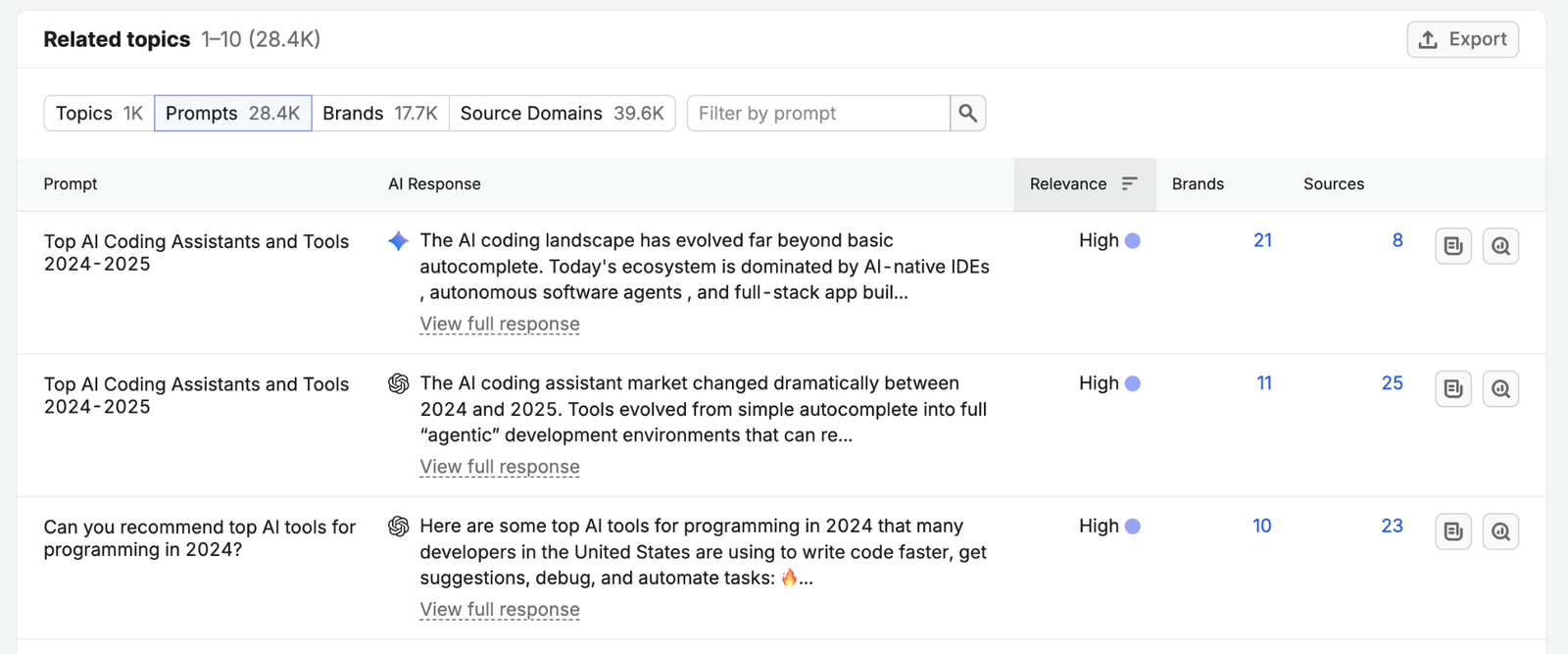
Prompts should read like questions, not keywords: "what's the cheapest project management tool for a 10-person agency?" rather than "project management software pricing." Add one follow-up per topic too, since the sidebar is built to keep conversations going. Prompt Research in Semrush's AI Visibility Toolkit helps here: it shows real prompts in a topic, the AI response for each, and how many brands and sources each answer includes.
Keep the lists short. Twenty to forty keywords and fifteen to thirty prompts is plenty for a baseline you'll actually read every week.
Sources: Semrush KB: Prompt Research report
Step 2: Set up daily rank tracking on desktop
Create a Position Tracking project in Semrush for your domain. Three settings matter for this baseline:
Set the device to desktop, because that's where the homepage sidebar is rolling out. Set the location to the market you sell in, down to the city if you're local. And tag every keyword with its topic from Step 1, so you can compare topics later instead of one long list.
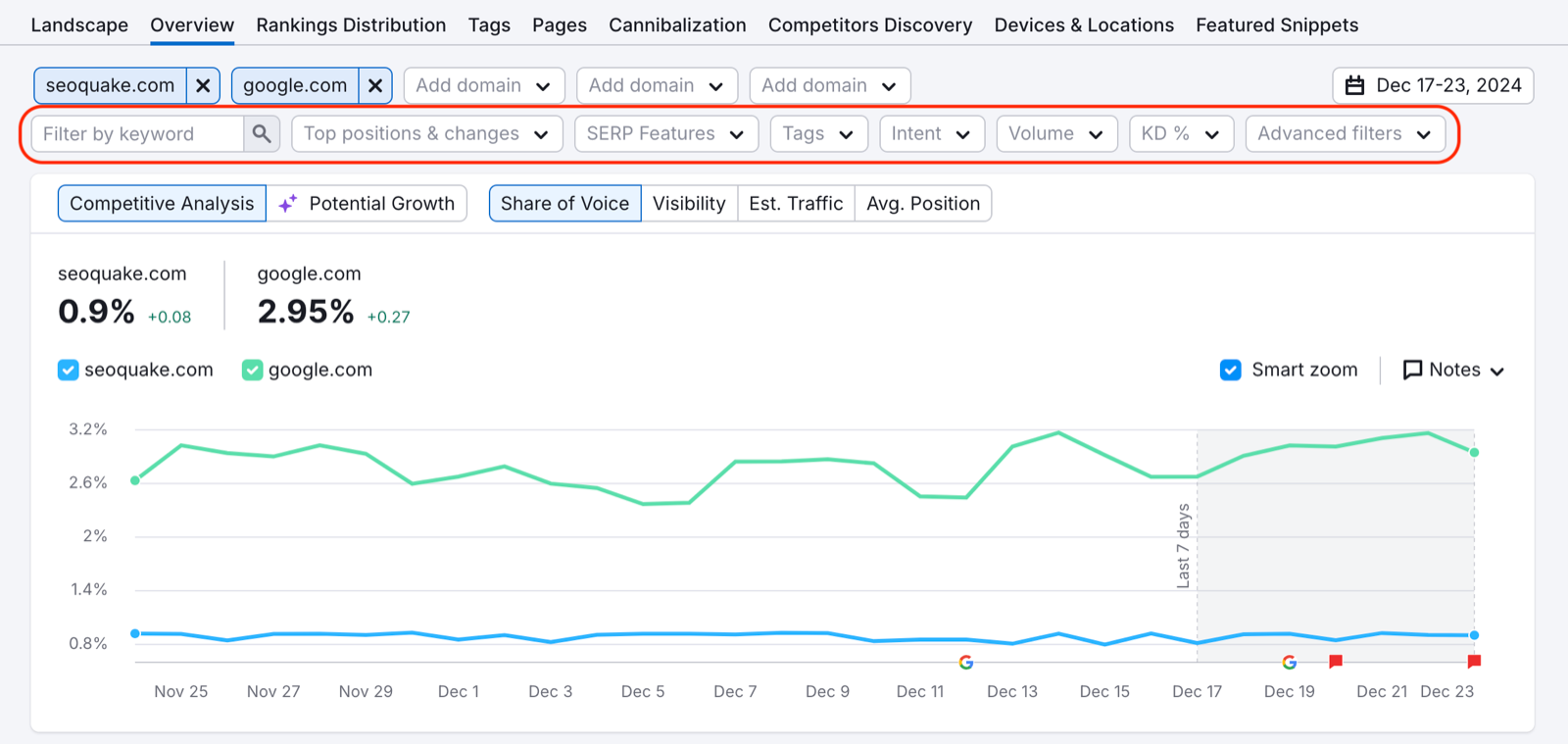
Add two or three competitors you actually lose deals to. Position Tracking checks rankings daily and shows visibility and share of voice for each, so if a rival climbs while you hold steady, you'll see it in the same chart.
Step 3: Track your prompts in ChatGPT, AI Mode and Gemini
Next, add the prompts from Step 1 to Prompt Tracking, grouped by the same topics. It checks each prompt daily in ChatGPT, Google AI Mode and Gemini and records whether your brand is mentioned, your position in the answer and which pages are cited. Position Tracking projects can also show these AI targets next to your SEO keywords, so both views live in one project.
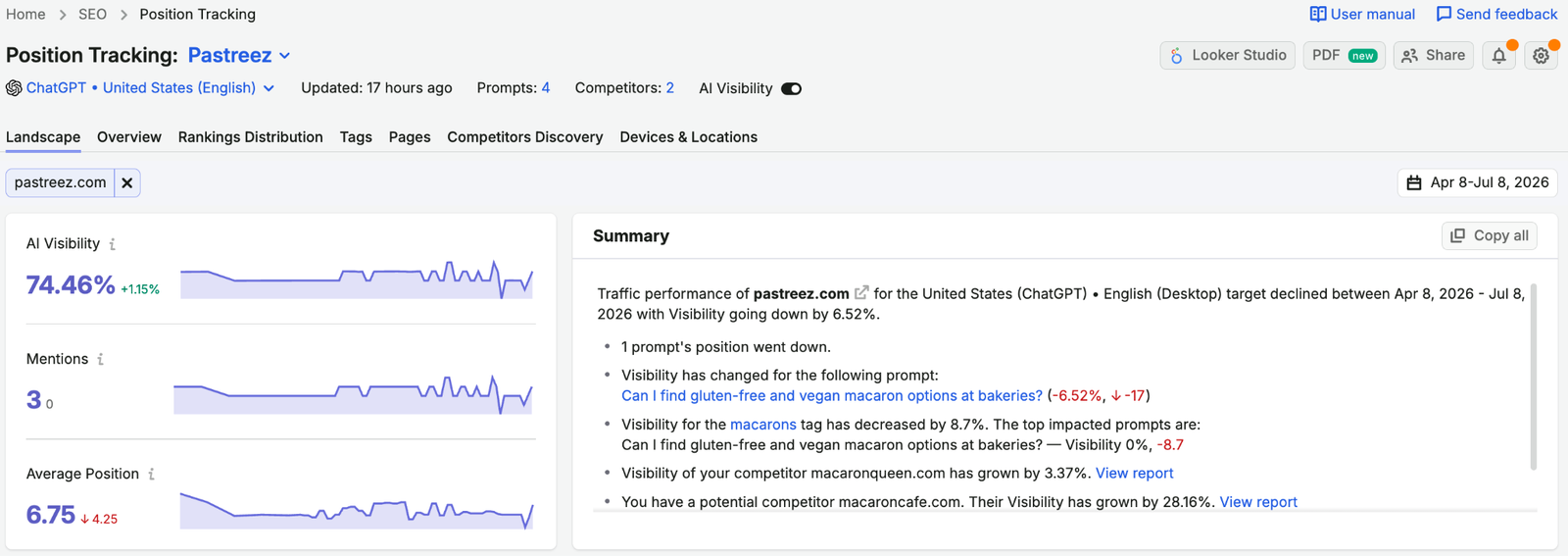
Record mentions and citations separately. A citation means the answer used your page as a source. A mention means it named your brand. They move independently, and the gap between them is often the most useful number in the sheet.
Step 4: Take a snapshot of today's numbers
Before the first weekly check, save a one-off snapshot of the whole domain. Semrush's Domain Overview now shows AI Search numbers next to the classic SEO ones. Here's ours for aieatingtheworld.com on November 24, 2026:

And the organic keyword trend for the past month, from Organic Rankings:
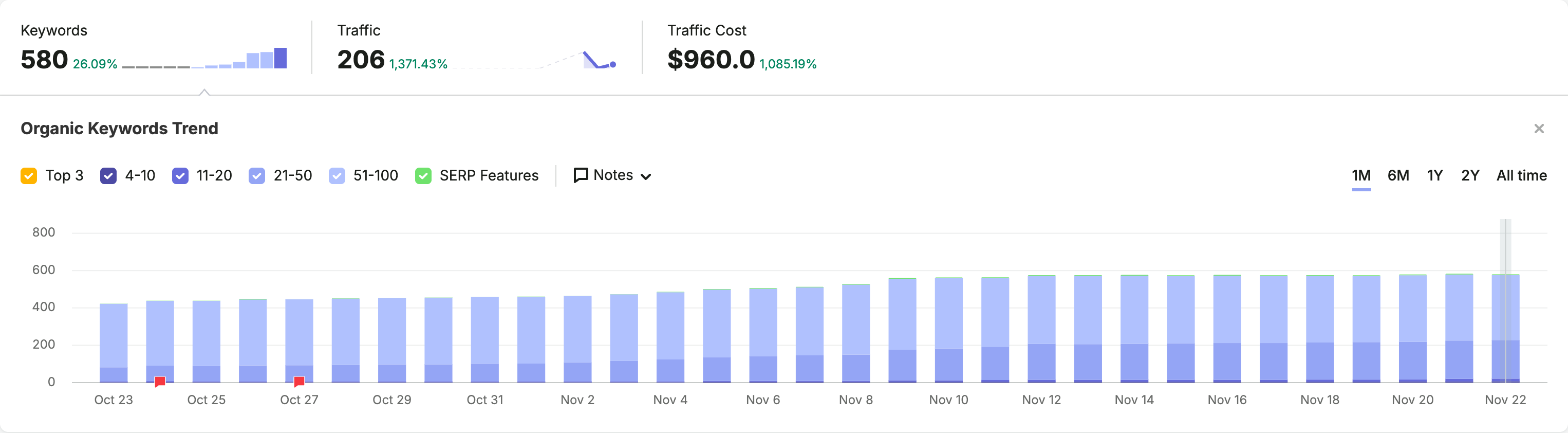
Read together, these tell a story we'd miss with either one alone. Our ranking keywords grew from about 420 to 580 in a month, and three of our pages are cited in AI answers, one in AI Mode. But the brand was mentioned zero times. If AI Mode use grows on our audience's desktops, rankings alone would look fine while the number that matters for being remembered stays at zero. Save these screenshots with the date in the file name.
Step 5: Build a weekly sheet that joins the two
Make one row per topic and five columns: average rank from Position Tracking, AI mentions and AI citations from Prompt Tracking (as "x of y prompts"), and clicks from the Search Console Performance report, filtered to desktop and to the pages for that topic. Copy the numbers in on the same day each week.
One row per topic, checked every week
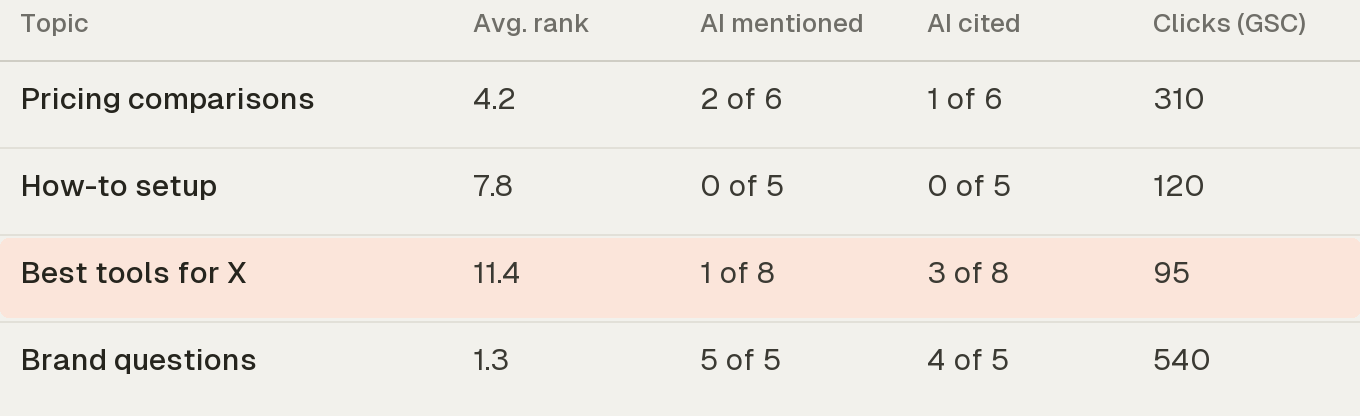
Topics are the right unit because single prompts and keywords are noisy. AI answers change from day to day, and one keyword can swing a few positions without meaning anything. A topic row smooths that out.
Step 6: Read the changes before you react
Most weeks nothing will move much. When something does, the pattern across columns tells you where to look first:
How to read a change in the baseline
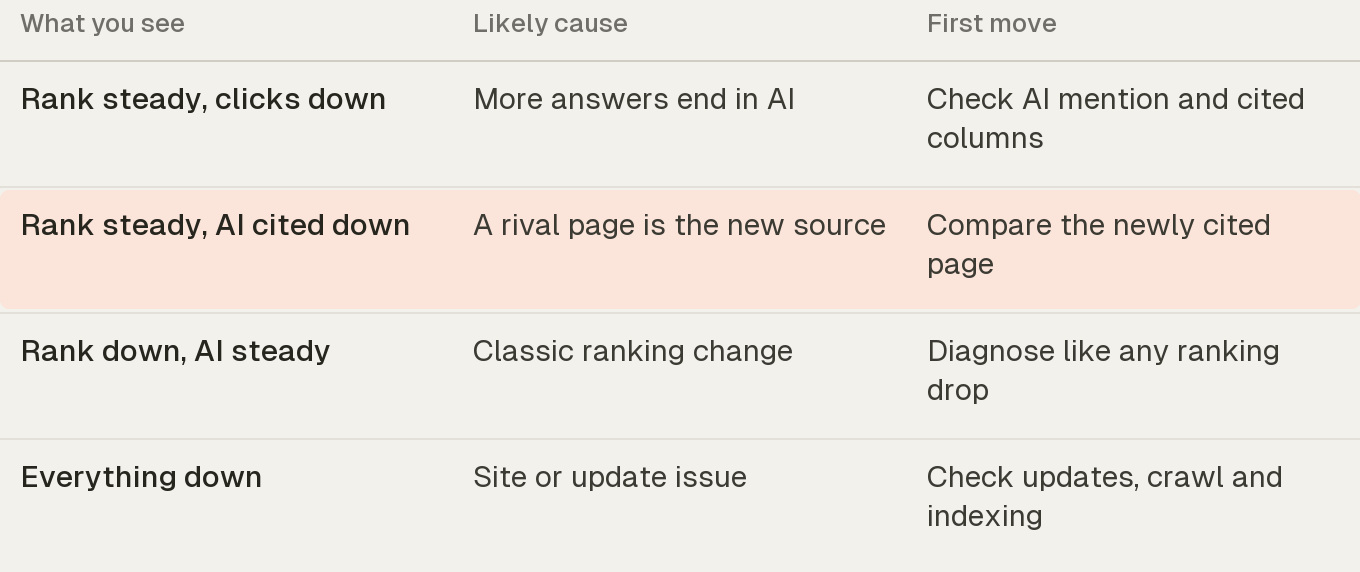
The first row is the one the sidebar could cause: rankings hold, clicks slip, and the answer is happening inside AI Mode. If you see it, look at which prompts in that topic name competitors and not you, and start there. Don't rewrite pages in a panic after one week. Wait for two or three weeks of the same pattern.
A prompt to summarize each week
Paste last week's and this week's rows into ChatGPT, Claude or Gemini with this prompt to get a short summary for your team. The model only sorts what you give it, so the numbers still come from Semrush and Search Console.
Start before the sidebar reaches your audience
Setup takes about an hour, and the first useful comparison comes after two weekly checks. Semrush One includes the SEO Toolkit with Position Tracking and the AI Visibility Toolkit with Prompt Tracking, so the whole baseline lives in one account. It has a 7-day free trial, which is enough to set up both and record your first snapshot.
Your AI visibility tracking checklist
Sources
Founder and Editor
Brian Weerasinghe is the founder and editor of AI Eating The World, where he covers artificial intelligence, tech companies, layoffs, startups, and the future of work. His reporting focuses on how AI is transforming businesses, products, and the global workforce. He writes about major developments across the AI industry, from enterprise adoption and funding trends to the real-world impact of automation and emerging technologies.