AI Brand Monitoring: How to Find and Fix What AI Says About Your Brand
A five-step routine to read the exact words AI answers use about you, trace wrong claims to their source, publish the facts that fix them, and check that the wording changes.
AI brand monitoring used to mean checking whether ChatGPT mentions you at all. That's no longer enough. This guide shows how to read the exact words AI answers use about your brand, trace each wrong or outdated claim to the page it came from, publish the fact that fixes it, and re-check the same prompts until the wording changes.
Best for
- Marketing leads who own brand reputation
- SEO and PR teams working on AI visibility
- Founders who see their product described wrong in ChatGPT
Requirements
- Five to ten buyer prompts about your category
- A list of current facts: pricing, audience, limits, programs
- Semrush AI Visibility Toolkit or a Semrush One trial
Why being mentioned isn't the same as being described well
When a buyer asks an AI assistant about your category, the answer is written from whatever facts the model can find. If your own pages say "contact us for pricing" or "the leading platform," there's nothing to quote, so the answer fills the gap with review sites, old news, reseller pages and forum threads. Your brand still gets mentioned. It just gets described by someone else.
That's why a mention count can look healthy while the story is wrong. A brand can be named in most answers and still be described with an old price, a discontinued feature or a competitor's framing. The fix isn't more content. It's a monitoring and correction routine, which is what the rest of this guide builds.
Fix the source, not the answer
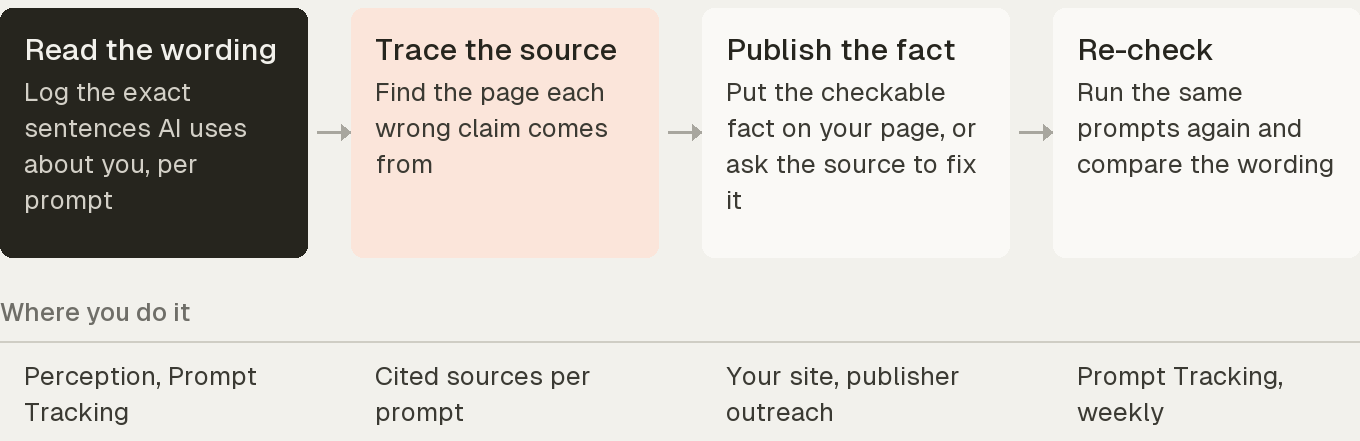
Step 1: Read the wording AI uses about you
Start with how AI platforms describe you, not whether they do. Semrush's AI Visibility Toolkit has a Brand Performance section built for this. Brand Performance compares your share of voice and sentiment with competitors, and Perception breaks down the attributes and sentiment AI answers attach to your brand, platform by platform.
Here's a real example from Semrush's free sample report for Warby Parker. The Brand Performance view plots share of voice against sentiment for five eyewear brands:
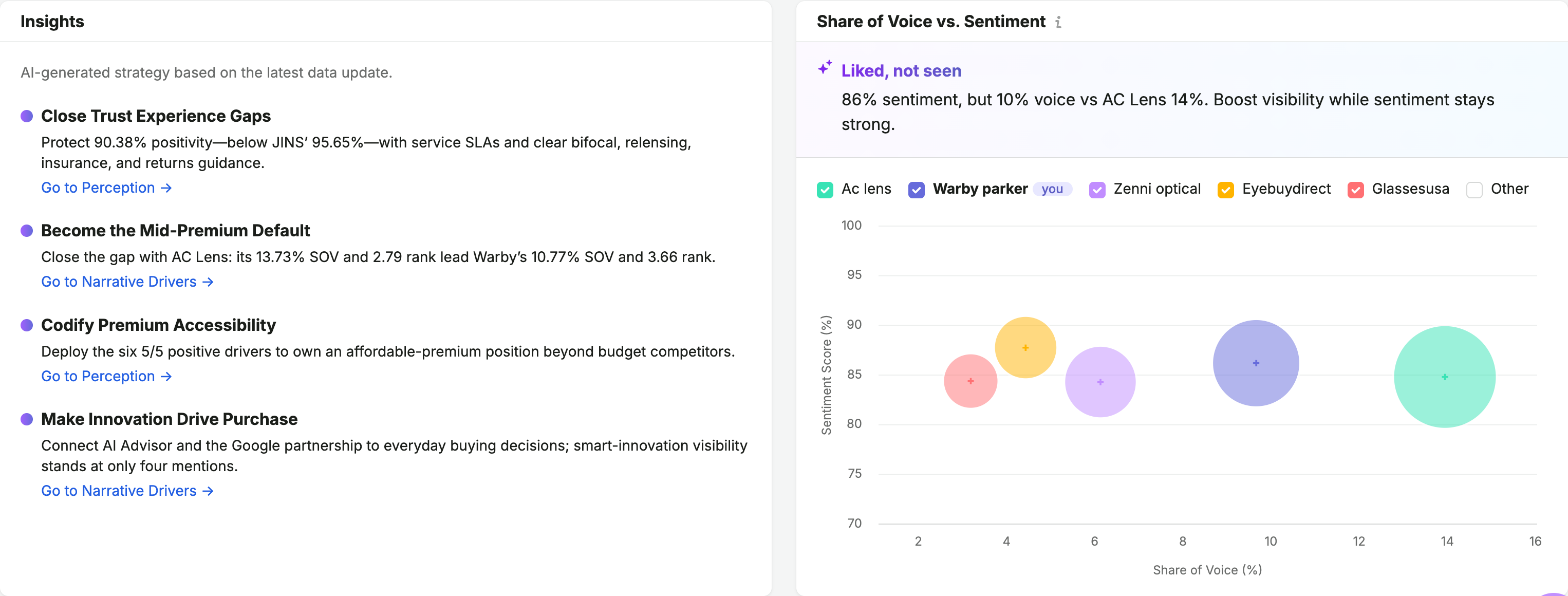
Semrush labels this one "Liked, not seen": 86% favorable sentiment but about 10% share of voice, behind AC Lens at about 14%. That's a different problem from being disliked, and it calls for a different fix: more coverage on the prompts where the rival gets named, rather than better reviews.
Then open Perception. The Insights panel turns the analysis into plain recommendations, and one of them is exactly the kind of narrative problem this guide is about:
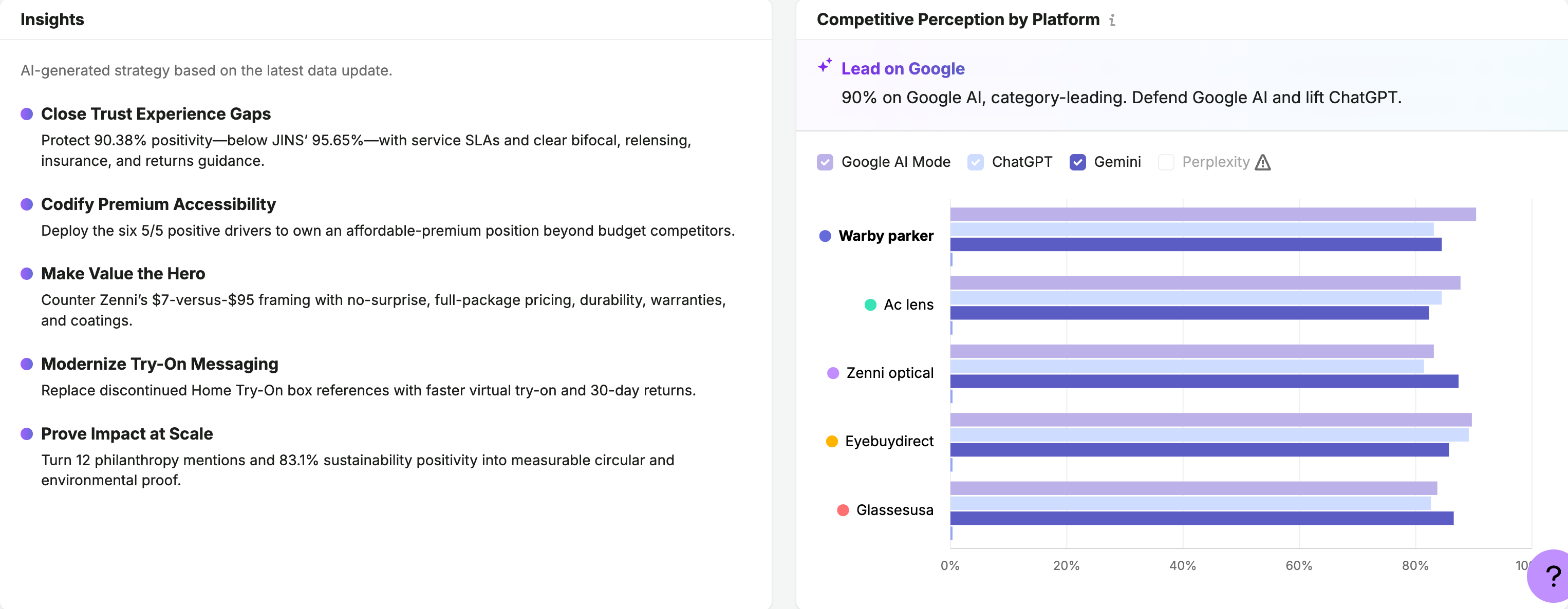
"Replace discontinued Home Try-On box references." Warby Parker ended its free Home Try-On program in 2025 and moved shoppers to virtual try-on and stores, yet AI answers keep framing the brand around the old box. Nothing on that list is a ranking problem. It's a description problem, and you'd never see it in a mention count.
Step 2: Sort every weak claim into one of three buckets
Perception's Key Sentiment Drivers list what helps and what hurts. Read the "Areas for Improvement" column one line at a time:
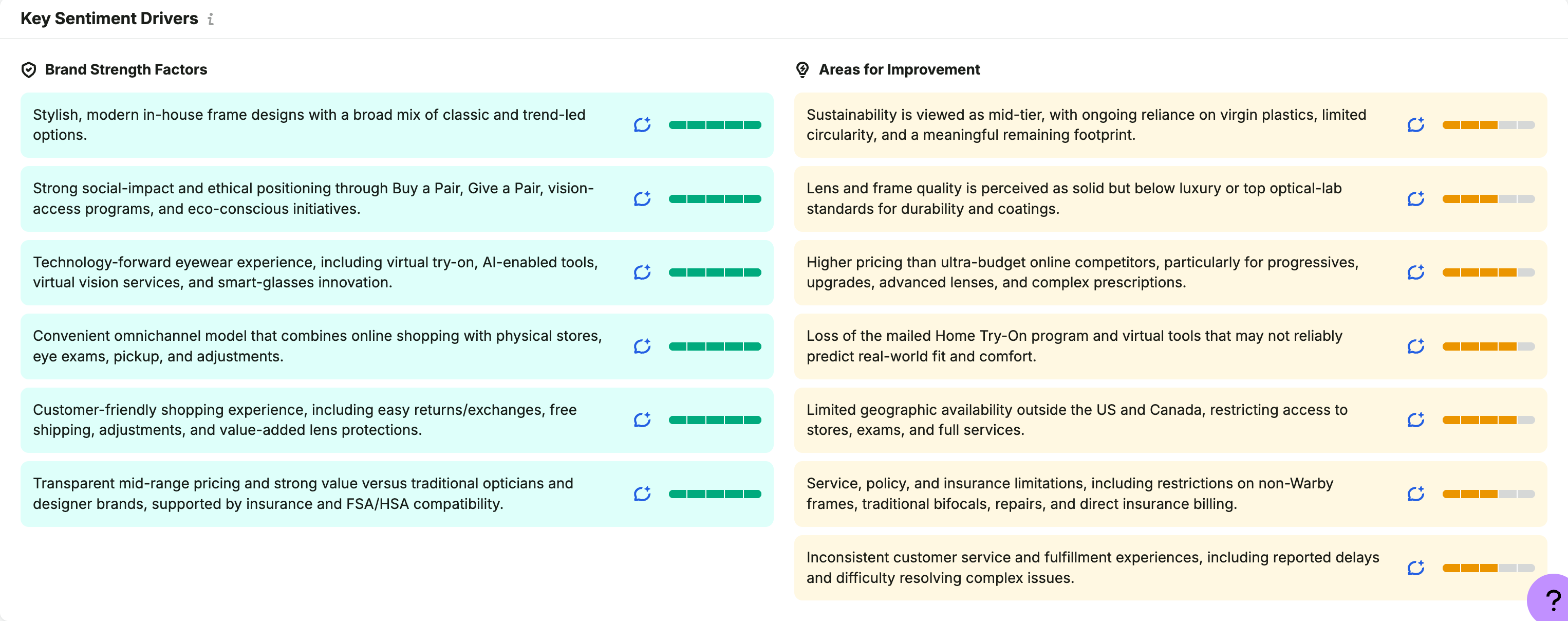
Every line belongs in one of three buckets, and each bucket has a different owner:
- Missing fact. The claim is wrong or vague because your own pages never state the fact. Owner: whoever writes the page. Fix it on your site.
- Outdated or wrong source. A third-party page says something that used to be true or never was. Owner: SEO or PR. Ask the source to correct it, and publish the current fact yourself.
- True but unflattering. The answer is accurate, like higher prices for progressive lenses. Owner: product or marketing. Explain the trade-off with facts, or change the offer. Don't try to argue the model out of it.
Step 3: Trace each wrong claim to the page it came from
For the first two buckets you need the source. Add the prompts where the bad wording shows up to Prompt Tracking, which checks them daily in ChatGPT, Google AI Mode and Gemini. Its Sources tab lists every page cited across those prompts, grouped into your own domain, competitors, knowledge bases, social and other categories, with how often your brand was mentioned next to each one.
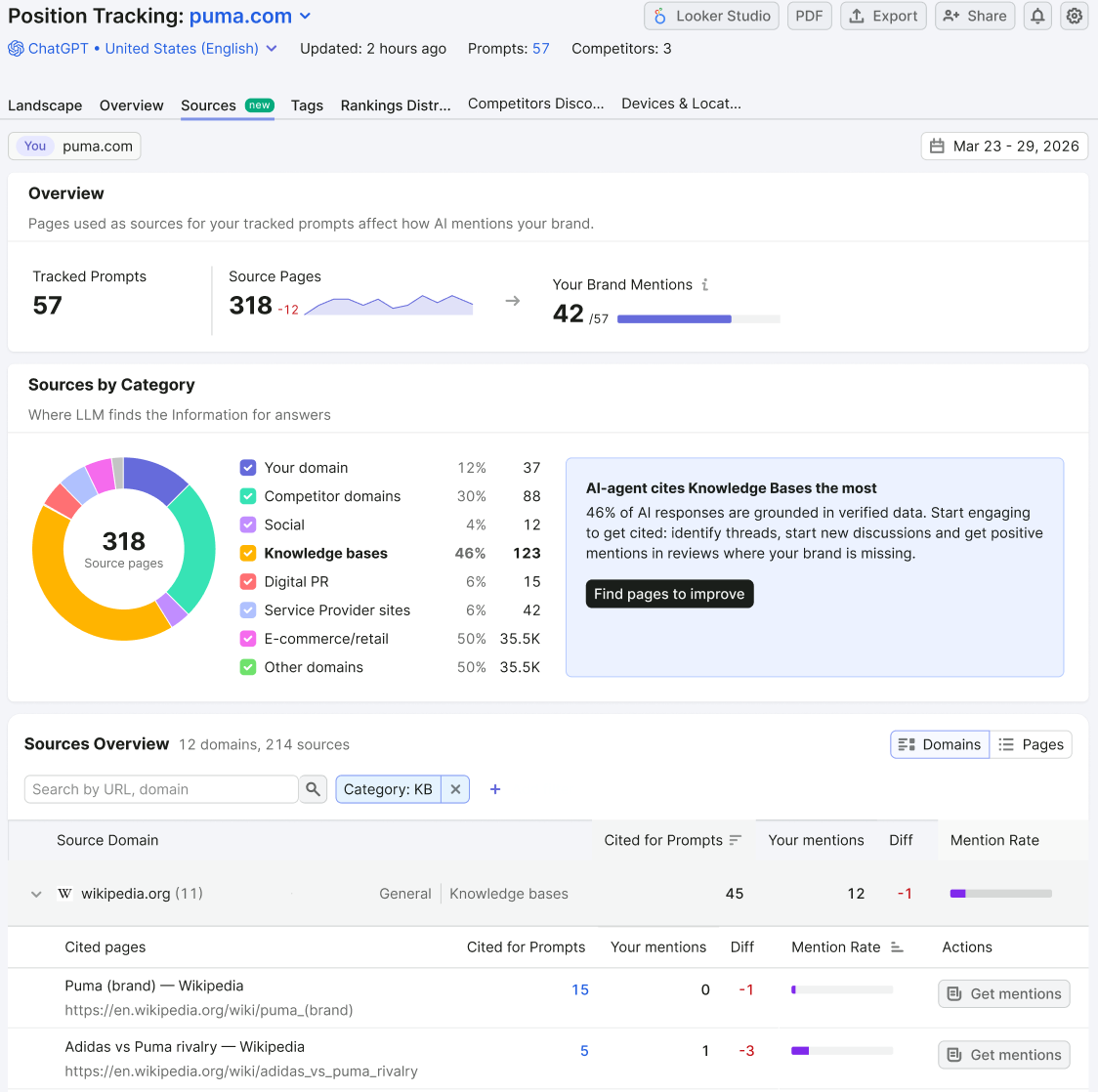
Open the cited pages for each problem prompt and search them for the exact wording. Usually you'll find one of three things: an old review that still ranks, a reseller or comparison page with outdated pricing, or a forum thread that answered the question when your site didn't. Write the URL next to the claim in your log. That URL is your to-do list.
If the right questions aren't in your prompt set yet, Prompt Research shows the prompts people ask AI platforms about your category, with the AI response, the brands mentioned and the sources cited for each.
Step 4: Publish the fact where models can read it
For missing facts, rewrite the page so the fact is stated plainly, in one sentence, near the top of the section that answers the question. Write it the way you'd want it repeated: a number, a name, a date, a limit.
Turn positioning lines into facts a model can repeat
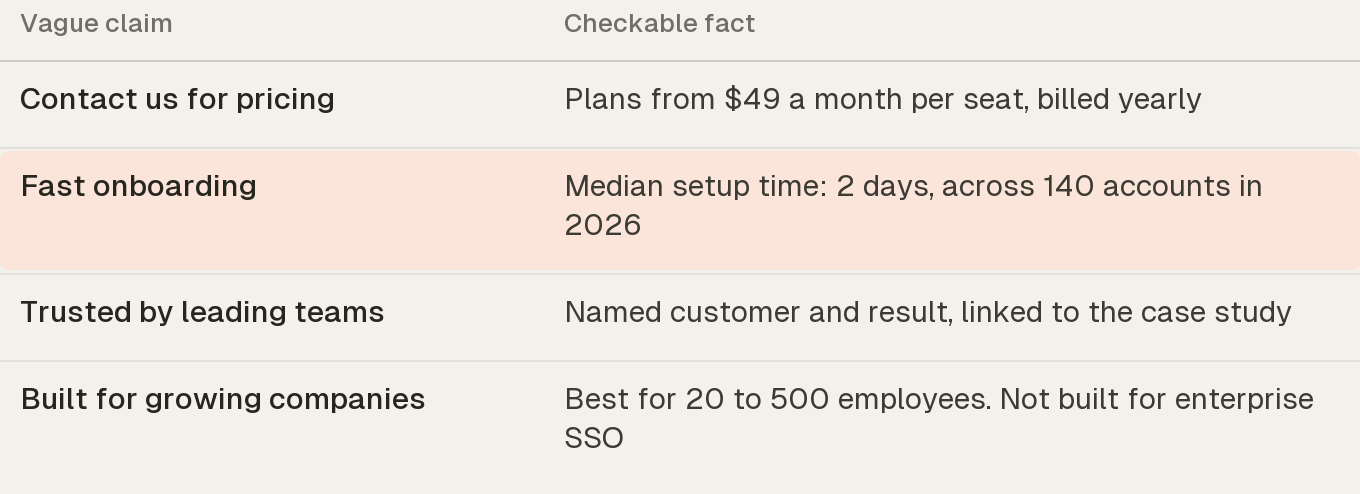
Two details matter more than they look. First, say who the product isn't for. "Not built for enterprise SSO" gives an assistant a clean reason to recommend you to the right buyer and not the wrong one. Second, publish the price if you can. When a page stays silent on price, the answer quotes whatever number it finds elsewhere.
Back the visible facts with structured data where it fits: Organization markup for your name, logo and official profiles, and Product markup for prices and offers. Markup doesn't replace the text on the page. It makes the same facts easier to read.
A prompt for third-party correction requests
For outdated third-party pages, a short, specific correction request works better than a general pitch. Use this with ChatGPT, Claude or Gemini to draft one per page, then send it yourself. Only ask for factual fixes, and keep a public source ready for every one.
Step 5: Re-check the same prompts until the wording changes
Keep the prompt set fixed so the before and after are comparable. Once a week, compare three things for each problem prompt: whether the wrong claim still appears, which page is now cited for it, and whether your brand's sentiment and share of voice moved in Brand Performance.
Give it a few weeks. AI answers change from day to day, and pages are re-crawled on their own schedule, so a fix published on Monday won't show up by Tuesday. And be honest about limits: publishing a fact doesn't guarantee an answer repeats it. What it does is replace a gap with something better to quote.
The AI Visibility Toolkit is a $99-a-month add-on, and Semrush One includes it alongside the SEO Toolkit. Semrush One has a 7-day free trial, which is enough to read your Perception report, set up Prompt Tracking for your problem prompts and log the first baseline.
Your AI brand monitoring checklist
Sources
- Customer Experience Dive: Warby Parker ends Home Try-On program, focuses on stores and digital (August 2025)
- Google Search Central: Organization structured data
- Google Search Central: Product structured data
- Semrush KB: AI Visibility Toolkit
- Semrush KB: Brand Performance reports
- Semrush KB: Prompt Tracking
- Semrush KB: Prompt Research report
- Semrush KB: Semrush One
Founder and Editor
Brian Weerasinghe is the founder and editor of AI Eating The World, where he covers artificial intelligence, tech companies, layoffs, startups, and the future of work. His reporting focuses on how AI is transforming businesses, products, and the global workforce. He writes about major developments across the AI industry, from enterprise adoption and funding trends to the real-world impact of automation and emerging technologies.