ChatGPT Business Hub shows mentions and website clicks, but a mention only counts when ChatGPT references your website. Here's why the numbers look low, what they leave out, and a simple AI visibility report that combines them.
ChatGPT Business Hub finally gives you a number
For two years, the honest answer to "how often does ChatGPT send us customers?" was a shrug and a referral line in analytics. On November 10, OpenAI launched ChatGPT Business Hub, a free dashboard where a verified business can see its own ChatGPT mentions and website clicks. It's still in beta, per TechCrunch, but for many US teams it's the first first-party AI visibility number they've had.
The first week also produced a wave of confused screenshots. Some owners saw blank tiles. Others saw a mention count far below what their AI visibility tool reported for the same brand. Neither is a bug. Business Hub counts something narrower than most marketers assume, and once you read the definitions, the numbers stop contradicting each other.
That matters because ChatGPT SEO has mostly run on proxies until now: third-party prompt sampling on one side, and a thin referral segment in your ChatGPT analytics on the other. Business Hub adds OpenAI's own count to that mix. It doesn't replace the other two, and treating it as the single source of truth is where most of the reporting confusion starts.
If you haven't claimed your profile yet, our Business Hub setup guide walks through verification. This piece is about what happens after: what the numbers mean, what they leave out, and how to report them without misleading anyone.
What a "mention" means in Business Hub
OpenAI's setup guide defines each insight, and the definitions are stricter than the word suggests. Insights cover the past 28 days in aggregate, and they're split into three parts:

- Mentions: for an online business, a mention counts only when ChatGPT references your website. OpenAI says the brand name alone doesn't count. For a local business, showing that location as a result counts, even if nobody opens it.
- Website clicks: how often people click through to your site from ChatGPT.
- Discovery topics: common themes in answers that mentioned or cited you. OpenAI notes these don't reveal individual prompts or measure intent.
Why your numbers look wrong (they probably aren't)
Three things explain most of the confusion we've seen.
Blank is not zero. OpenAI's guide says a blank metric can mean activity hasn't reached the reporting threshold, data is still being collected, or reporting isn't available. Small and new sites will sit below that threshold for a while. Don't report a blank tile as "ChatGPT never mentions us."
It counts links, not names. If ChatGPT recommends your product by name but cites a review site or Reddit thread, an online business gets no mention in Business Hub. AI visibility tools usually count that brand mention. So a tool can show dozens of mentions while Business Hub shows a handful, and both are correct.
A quick example. Say a buyer asks ChatGPT for the best invoicing tools for a five-person agency. The answer names your product third and links to a comparison article on another site. Your AI visibility tool logs a brand mention. Business Hub logs nothing, because ChatGPT didn't reference your website. If a second answer links straight to your pricing page, Business Hub counts that as a mention, and a click if the buyer follows it. Same brand, same week, two very different counts.
It only sees ChatGPT. Google AI Overviews, AI Mode, Gemini and Perplexity answers don't appear in Business Hub at all. And a click isn't a visit or a sale, so conversions still have to come from your analytics.

One more point for anyone hoping the dashboard is a lever: OpenAI's FAQ says claiming lets you manage your information but doesn't guarantee more visibility, and that advertising doesn't influence ChatGPT's independent answers. Business Hub is a meter, not a ranking factor.
Fill the gaps with an AI visibility tool
Business Hub answers one question well: is ChatGPT linking to us, and are people clicking? The questions leadership asks next, such as which prompts we show up for, who gets recommended instead of us, and whether Google's AI answers are any different, need prompt-level data from outside OpenAI. Your AI search visibility spans more than one assistant, and so should the measurement.
That's the job of the AI Visibility Toolkit in Semrush. Its Visibility Overview report tracks mentions, citations, cited pages and "missing prompts," where competitors appear and you don't. Prompt Tracking follows a fixed set of prompts daily across ChatGPT, Google AI Mode and Gemini, so you can see which questions actually produce your Business Hub mentions.
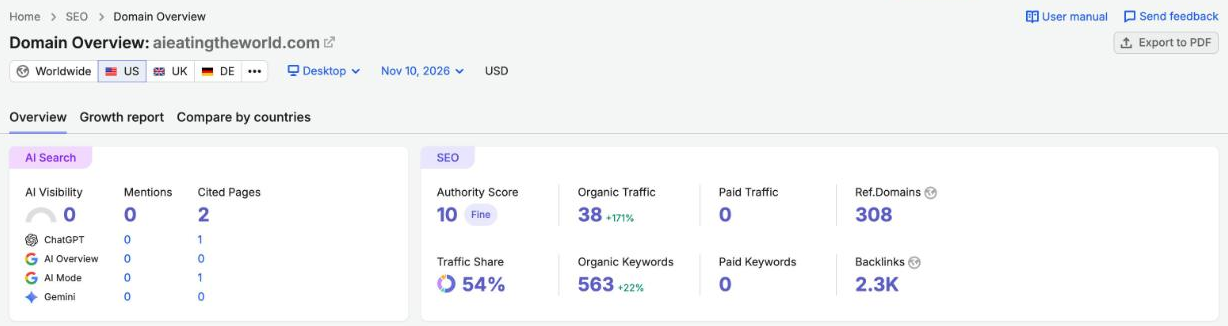
Here's what that looked like on our own site. Semrush's Domain Overview for aieatingtheworld.com on November 10 showed zero brand mentions but two cited pages in AI answers, one of them in ChatGPT. In Business Hub terms, that ChatGPT citation is exactly the kind of website reference that counts as a mention, and the zero shows how few answers name us outright. A small site like ours would likely see a blank tile in Business Hub for now, which is why the outside view helps.
A monthly AI visibility report that holds up
The mistake to avoid is picking one number and calling it "AI visibility." Report the sources side by side, each labeled with what it measures. A one-page monthly report can be this simple:
Line 1 is Business Hub: ChatGPT mentions and website clicks for the last 28 days, with blanks written as "below threshold," not zero. Line 2 is analytics: sessions and conversions from chatgpt.com referrals. Line 3 is your AI visibility tool: brand mentions, citations and share of voice across ChatGPT, AI Mode and Gemini for a fixed prompt set.
Share of voice is the line executives understand fastest, because it puts you next to named competitors. Semrush's Brand Performance report charts it over time and flags when your share is slipping, as in the example below.

Read the three lines together. Rising tool mentions with flat Business Hub mentions means ChatGPT talks about you but cites other sites, so earn coverage on the pages it trusts and make your own pages easier to cite. Rising Business Hub clicks with flat conversions is a landing page problem, not a visibility one.
Semrush One includes the SEO Toolkit and the AI Visibility Toolkit, and it comes with a 7-day free trial, enough to set up a prompt set and compare it with your first Business Hub numbers.
What to do this week
Business Hub is a beta, and OpenAI has said it plans to expand it, so the metrics may change. For now:
- Claim and verify your business, then note the date, since insights cover a rolling 28 days.
- Write down how you'll report blanks before anyone sees one: below threshold, not zero.
- Pick 20 to 50 prompts your buyers actually ask and track them outside ChatGPT too.
- Add a chatgpt.com referral segment in analytics, so clicks can be matched to visits and sales.
- Review the three lines monthly, not daily. The 28-day window smooths short swings anyway.
Sources
- OpenAI Help Center: Setting up your business on ChatGPT
- OpenAI: Introducing businesses in ChatGPT
- TechCrunch: OpenAI rolls out new business profiles in ChatGPT
- Semrush KB: AI Visibility Toolkit
- Semrush KB: Visibility Overview report
- Semrush KB: Prompt Tracking
- Semrush KB: Brand Performance reports
- Semrush KB: Semrush One